
KJV
Click to Change

Return to Top























1. Not only does the Blue Letter Bible allow one to search for instances of a particular word in Scripture, but one can also see if a particular word has an entry in our theological dictionaries and topical concordances. The first step to using this tool is to run a single-word search for the desired word. The Bible Search is located both on our homepage and on any other page on the top AppBar Menu and the BLB Searches box in the right-side navigational menu. Simply enter the word for which you are searching and hit the Search button.
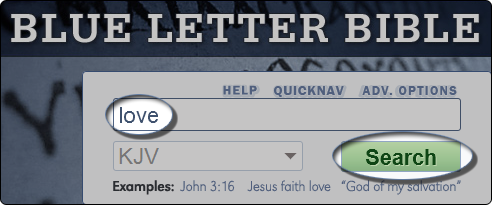
2. Under the heading, Dictionary Results, you'll find a drop-down menu of results that match your serach terms to our compiled reference material. Click on this menu to reveal your available choices.

3. Scroll through the list of entries to find one that interests you. Click on that entry to select it. This will take you to the reference work you have chosen. For our example: Easton's reference on Love.

1. Here is another way to use our dictionaries. On the top Menu Bar, hover over "Study" scroll to "Bible Reference" and click on "Encyclopedias / Dictionaries."

2. It will bring you to a Dictionary page ...
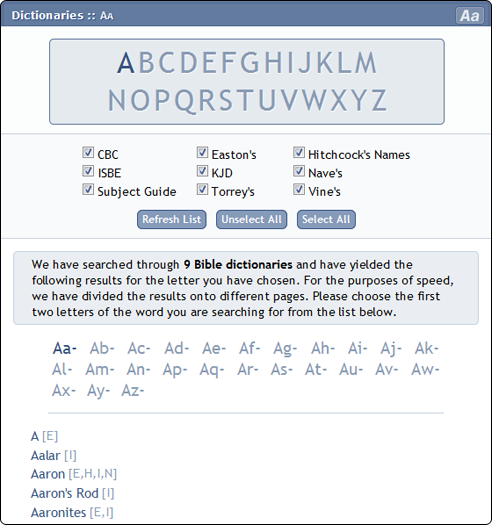
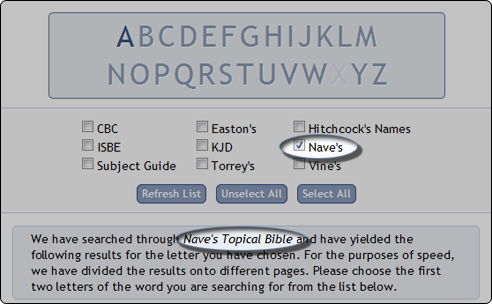
3. From here you can choose which Reference Works you would like to search. You can search all of them or click "Unselect All" and select the references desired. (Remember to click "Refresh List" to refresh the results. Notice that it shows which references have been selected, in our example the Nave's Topical Bible.)
4. When searching more than one Reference Work you will notice that each entry title is followed by a letter or letters in square brackets (like [E,H,I,N]).
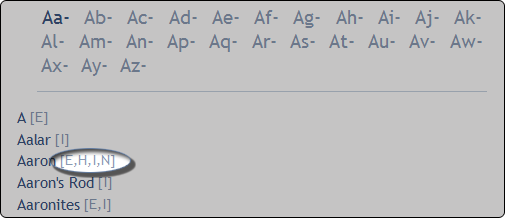
The abbreviations refer to the reference sources that are attached to each entry. The meanings of these abbreviations are as follows:
5. So for our example, "Aaron," it shows that there are results in Easton's, Hitchcock's, the ISBE, and Nave's. All four results will be brought up on the same page. At the top of the page is an index so you can jump to whichever section you would like to read first.

6. This Dictionary page, just like any regular dictionary, works alphabetically. If you are wanting to learn more about "Frankincense" for example. You would click on the letter "F" in the alphabet, the you would click on "Fr" and then go down the list until you find the word "Frankincense."


We hope you have enjoyed this tutorial and have found it helpful in understanding the ins and outs of how to use the dictionaries.
|
Line-By-Line Order:
 Verse-ReferenceReference-VerseSeparate LineVerse OnlyReference Only Verse-ReferenceReference-VerseSeparate LineVerse OnlyReference Only |
Reference Delimiters:
None — Jhn 1:1 KJV Square — [Jhn 1:1 KJV]Curly — {Jhn 1:1 KJV}Parens — (Jhn 1:1 KJV) Square — [Jhn 1:1 KJV]Curly — {Jhn 1:1 KJV}Parens — (Jhn 1:1 KJV) |
|
Paragraph Order:
Verse-ReferenceReference-VerseReference-Only |
Number Delimiters:*
No NumberNo Delimiter — 15Square — [15]Curly — {15}Parens — (15) |
|
Other Options:
 Abbreviate Books Abbreviate Books Use SBL Abbrev.En dash not Hyphen Use SBL Abbrev.En dash not Hyphen |
Quotes Around VersesRemove Square BracketsSort Canonically |
* 'Number Delimiters' only apply to 'Paragraph Order'
The Blue Letter Bible ministry and the BLB Institute hold to the historical, conservative Christian faith, which includes a firm belief in the inerrancy of Scripture. Since the text and audio content provided by BLB represent a range of evangelical traditions, all of the ideas and principles conveyed in the resource materials are not necessarily affirmed, in total, by this ministry.


Blue Letter Bible study tools make reading, searching and studying the Bible easy and rewarding.
Blue Letter Bible is a 501(c)(3) nonprofit organization
©2024 Blue Letter Bible | Privacy Policy


Note: MLA no longer requires the URL as part of their citation standard. Individual instructors or editors may still require the use of URLs.


Loading

Loading
| Interlinear |
| Bibles |
| Cross-Refs |
| Commentaries |
| Dictionaries |
| Miscellaneous |